Everyone’s talking about what AI can do and whether it’s good or bad. But nobody’s talking about what it costs and where the gains actually go (hint: I’m not talking about dollars). This isn’t a case against AI. It’s practical advice from someone who is leaning heavily into using it every day.
Maybe you’ve kicked off a few agents, tried some different harnesses, and subscribed to a few YouTubers. Now you’re shipping faster than ever before. You’ve drunk the Kool-Aid, and you’re a believer. But lately you’re absolutely exhausted. You feel “fried,” almost like your head has been on fire. Your eyes are tired. What the hell is going on?
The biological case for slowing down#
Richard Cytowic makes this plain in Your Brain Wasn’t Built to Hold This Much Information: your brain burns ATP for every decision, every context switch, every review pass. You have a finite cognitive budget every day, and you’re spending it whether the work feels hard or not.
A Harvard Business Review study confirmed what a lot of people already felt but couldn’t name: AI-assisted work produces a specific kind of exhaustion. Not from deep focus, but from throughput. You moved fast, you produced a lot, and somehow you’re more depleted than before. What’s new? Context switching.
All about context#
No, not LLM context (which I’m sure you’re becoming an expert in). Every time you jump between tasks or check on an agent’s output, you pay an ATP toll. The agent pop-up saying “I need you to make a decision” is costing you, and you probably don’t realize it.
I felt this for years before I had the vocabulary for it. Understanding how my brain handles flow and interruption isn’t just personal experience – it’s shaped how I structure and approach my work.
As someone with ADHD, I know that the pop-up or the small red circle above the app is trouble. I’ve learned over years that “a quick check” is never just that, and if I’m not careful I can lose hours. To make it worse, the fear of forgetting to go back adds to the urgency. My brain says, “if you don’t look at that now, you won’t remember for another hour or two.” That’s fine for important things, but these pop-ups aren’t that.
The systemic trap: The vampiric effect#
Steve Yegge named this in From IDEs to AI Agents as the Vampiric Effect: the cognitive overload you start to experience as you try to keep these agents running. There’s another concerning aspect – companies absorb every productivity gain you produce, and that isn’t always reflected back on you. The baseline just moves up. You’re not 3x more productive and compensated accordingly – you’re just expected to produce 3x now. The HBR study corroborates that. It happened with email and smartphones. AI is just faster, and the extraction is harder to see. It’s also slightly insidious because it “feels easy,” and you could see how some would argue that it shouldn’t change compensation.
So is the vampire the LLM, or is it the business that keeps pushing you to your physical limits? Either way, the vampire won’t kill you… It keeps you just alive enough to keep giving.
The wrong kind of junior#
Here’s a useful mental model: each agent you run is a junior engineer who wants your attention – but the kind that never remembers and asks you the same thing over and over.
Now imagine you have five of them. They’re all working on something, they all have questions, and they’re all waiting on you. Oh, and they’re asking you right when you’re in the middle of something else. Picture sitting at your desk with people constantly tapping on your shoulder asking for something.
That’s not a productivity multiplier. That’s management overhead you didn’t sign up for, and it’s probably not showing up in your comp.
The people who get wrecked by this are the ones who think AI agents are like background processes. They’re not. They require steering, review, judgment calls, and escalation handling. That’s real cognitive work.
What I actually do#
By following my simple course for $99.99 you too can… Just kidding!
I run my agents in WezTerm, which lets me split panes and use CLI tools side by side. For notifications, I needed something that wouldn’t break my flow. I forked my current ZeBar theme of choice and built an “agent-deck”-like feature. It adds a silent visual indicator at the top of my screen that shows agent status without interrupting me. No pop-ups, no sounds, no unwanted context switching. Just queued, on my terms.
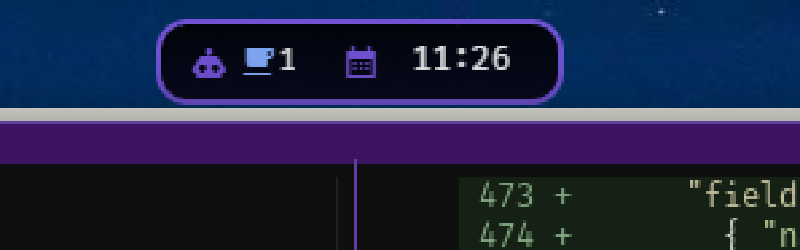

The reason: notifications designed to interrupt get addressed immediately, even when that’s not what the moment calls for. That’s an ADHD panic response masquerading as productivity. The fix is simple – don’t let the tool set the terms of your attention. You check when you’re ready, not when the computer/agent/harness demands it. This article is about AI, but keep that in mind for all your tools.
This isn’t just useful if you have focus challenges. It’s useful for anyone trying to do deep work. The goal is the same: protect the windows where you can actually get into flow. That’s when work is most enjoyable, and when you produce the most value.
Practical advice#
Build tooling to fill your gaps, not to replace your judgment. Optimize for you, not for the tools.
The goal isn’t maximum agent throughput. The goal is maximizing the time you spend on work that gets you into flow and minimizing the interruptions that pull you out. AI should handle the mechanical, the repetitive, the first pass. You handle the judgment, the architecture, the decisions that require context no agent has.
And watch the baseline. If your output keeps going up and nothing else does, you’re feeding the vampire. That’s worth naming – with yourself, and with whoever sets your goals.